One of the easiest mistakes to make with AI is assuming that polished output is safe output.
It reads cleanly.
It sounds organized.
It looks close enough.
So people move fast, forward it, send it, or paste it into something important.
That is where problems start.
Because the biggest risk with AI output is often not that it is obviously wrong. It is that it is subtly wrong — slightly off in tone, missing context, too generic, too confident, or not actually useful once a real person receives it.
That is why review matters.
If prompting helps you get to a draft faster, review is what makes that draft professionally usable.
Why Reviewing AI Output Matters More Than Most People Think
Many professionals already know they should "check AI output."
But that advice is too vague to be useful.
What actually needs to be checked?
The answer is more than grammar or surface polish.
A professional review has to catch several kinds of issues:
- Facts that are incorrect or overstated
- Context the model could not have known
- Tone that does not fit the audience
- Sensitive information that should not be shared further
- Writing that sounds polished but does not move anything forward
This matters because once you use the output, it reflects on you. The tool does not own the consequence. You do.
The 5-Part Review Habit
A useful review process does not have to be long.
It just has to be consistent.
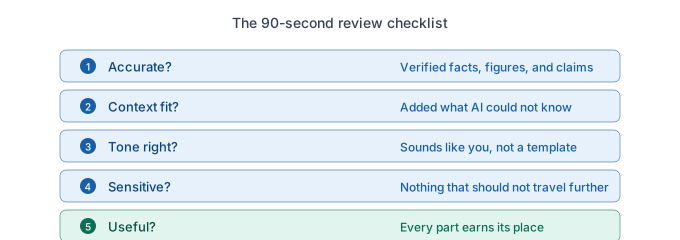
Here is a simple five-part habit that works well before sending or sharing AI-assisted work.
1. Is It Accurate?
Start with the basics.
Check names, dates, figures, claims, references to events or metrics, and any statement that sounds more certain than the source actually supports.
AI can sound confident while being wrong. If something cannot be verified, remove it, soften it, or flag it.
2. Does It Fit the Context?
AI can write coherent output without knowing the real context around the work.
Ask:
- Does this reflect what actually happened?
- Is it missing anything important from prior conversations?
- Does it account for the relationship with the audience?
- Would this land differently inside my company than outside it?
- Is there any internal history or nuance AI could not have known?
Something can be cleanly written and still contextually wrong.
3. Is the Tone Right?
This is one of the most overlooked checks.
Read the output as the recipient would.
Ask:
- Does this sound like me?
- Is it too formal, too soft, too generic, or too polished?
- Does it sound like a real person or like a template?
- Is it appropriate for the audience and situation?
Tone problems often show up most in emails, summaries, and reports that feel "fine" at first glance but slightly off on a second read.
4. Is There Anything Sensitive in Here?
Before sending, check for:
- Confidential details
- Internal-only information
- Personally identifying information
- Sensitive names or situations
- Unnecessary specificity that could create risk if forwarded
Even a strong draft is not usable if it contains details that should not leave your desk.
5. Is It Actually Useful?
This question is underrated.
A piece of writing can be technically correct and still fail to do its job.
Ask:
- Does this move something forward?
- Does every sentence earn its place?
- Is the next step clear?
- Is the structure helping the reader, or just filling space?
- Would I be glad to receive this, or would it feel empty?
Useful beats polished.
How to Review Output Quickly Without Losing the Speed Benefit
A lot of people resist review because they worry it cancels out the time savings.
Usually, it does not.
A strong review habit can happen in 60 to 90 seconds.
Imagine you used AI to draft a meeting summary. Your review might look like this:
- Scan the action items and check owners and deadlines
- Add one decision that the notes implied but AI did not capture clearly
- Soften one sentence that sounds too formal for your team
- Remove one internal detail that does not need to travel further
- Tighten the closing so the next step is explicit
That is not a full rewrite. It is a professional pass. And it often makes the difference between "decent AI output" and something you would confidently send.
What Happens When You Skip Review
The risks are rarely dramatic in the moment.
They usually show up later.
You forward a summary with a factual miss and someone notices. You send an email that sounds too polished and oddly impersonal. You present a number you did not verify. You share analysis that sounds smart but cannot hold up to a follow-up question. You leave a sensitive detail in the draft because the output looked "done."
These are exactly the kinds of patterns that erode professional credibility over time:
- Copying output without reading it
- Using AI to sound like you understand something you do not
- Over-editing until the work loses your voice
- Trusting analysis without validation
- Letting AI make decisions you should own
Review is how you avoid those traps.
Using AI well is not just about getting useful output. It is about knowing when that output is ready to use. That is a different skill.
The professionals who benefit most from AI are not the ones who move the fastest at any cost. They are the ones who know how to preserve speed and trust. That starts with review.
If you want to build a stronger review habit and learn how to use AI with more judgment at work, OpPro AI's AI Productivity & Workflow Certification is designed to help working professionals do exactly that.