One of the biggest fears professionals have about AI is not that it will be wrong.
It is that it will be obvious.
You use AI to help draft an email, summarize a report, or tighten a piece of writing — and suddenly the output sounds a little too polished, a little too generic, or a little too much like it was produced by a machine trying to sound professional.
That concern is valid.
But the answer is not to stop using AI.
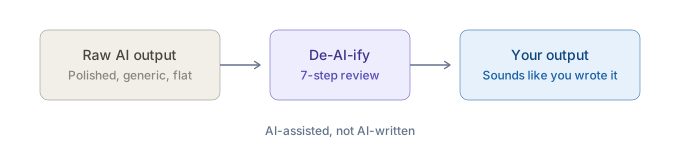
The answer is to learn how to de-AI-ify your work before it leaves your desk.
Because the real goal is not just faster output. It is faster output that still sounds clear, credible, natural, and like something you would send.
Why AI-Assisted Work Starts to Sound Like AI
AI usually sounds like AI for one simple reason:
People stop too early.
They get a decent first draft, see that it is "good enough," and move on. But polished is not the same as finished. And smooth is not the same as credible.
In practice, AI-assisted writing often starts to sound robotic when people do a few things wrong:
- They accept generic phrasing
- They skip the refinement step
- They fail to add real context
- They keep filler that sounds polished but says very little
- They let the writing become more formal than they would naturally sound
- They use AI to "improve" a draft until it no longer sounds like a real person wrote it
This is exactly why refinement matters so much.
A strong prompt helps. But the difference between a mediocre AI-assisted output and a strong one often comes down to what happens after the first response. In OpPro AI's framework, that is the Refine step — the part most people skip, even though it is where the biggest quality jump usually happens.
And even beyond refinement, there is another important principle:
The best AI-assisted work should be invisible.
Nobody should read your email or report and think, "AI wrote this." They should think, "This is clear, concise, and well-structured."
What "De-AI-ifying" Your Work Actually Means
De-AI-ifying your work does not mean pretending AI was never involved.
It also does not mean manually rewriting everything from scratch until the time savings disappear.
It means taking AI-generated or AI-assisted output and applying the last layer of professional judgment that makes it fit for real use.
That usually means making the work:
- More specific
- More natural
- More context-aware
- More aligned to your real voice
- Less padded
Think of it as the difference between a first draft and a final draft. AI gets you to the first draft faster. The de-AI-ify step is how you make it final.
The De-AI-ify Your Work Checklist
This is the practical core. Use this as a quick review pass before sending any AI-assisted output.
1. Cut Generic Filler
AI often adds phrases that sound polished but do not add much value.
Examples:
- "I hope this message finds you well"
- "In today's fast-paced environment"
- "It is important to note that"
- "I wanted to take a moment to"
- "Please do not hesitate to reach out"
These are not always wrong. They are just often unnecessary.
When in doubt, cut anything that sounds smooth but not useful.
2. Replace Vague Language With Specifics
AI tends to generalize. That can make writing sound safe, but also forgettable. Replace broad language with concrete details where appropriate.
Instead of:
- "We made meaningful progress this week"
Try:
- "We finalized the vendor shortlist, resolved the reporting issue, and confirmed next week's launch review"
Specifics make writing sound more grounded and more human.
3. Restore Your Natural Voice
One of the biggest mistakes people make is over-editing until the writing no longer sounds like them.
Repeated AI polishing can strip away personality and leave behind something that reads like a corporate template. The better approach is to use AI to improve clarity and structure, then add your voice back in on the final pass.
Ask yourself:
- Would I actually say this?
- Does this sound like my team, my role, and my tone?
- Is this warmer, stiffer, or more formal than I would naturally be?
You do not need to sound casual. You do need to sound real.
4. Add Context AI Could Not Know
AI can draft structure. It cannot know the invisible context around your work unless you add it.
That might include:
- What happened in last week's meeting
- Your relationship with the audience
- The political sensitivity of a situation
- Internal history
- What should be emphasized or softened
- What your company culture responds well to
This is one reason AI output often feels slightly off even when it looks polished. It may be technically coherent but contextually thin.
5. Verify Names, Facts, Numbers, and Claims
This is not just a credibility step. It is part of de-AI-ifying the work.
Nothing makes writing feel more careless than a polished sentence built around a wrong figure, made-up detail, or overstated claim.
A good professional review habit includes checking facts, figures, dates, names, references, and claims that sound more certain than the source supports.
6. Simplify Anything That Feels Over-Polished
AI often writes in a way that is technically clean but stylistically overdone.
If a sentence feels inflated, soften it.
Instead of:
- "We remain committed to driving alignment and operational excellence across key cross-functional priorities"
Try:
- "We're focused on staying aligned and moving the key work forward"
The goal is not to sound casual for the sake of it. The goal is to sound like a competent person, not a generated corporate statement.
7. Read It Once as the Recipient Would
This is one of the simplest and most powerful checks.
Before sending anything, ask:
- If I received this, would it feel natural?
- Would it feel useful?
- Would anything sound off, too polished, too generic, or oddly impersonal?
That final read catches more than people think.
How to Use AI Well Without Losing Credibility
The bigger lesson here is not just about writing. It is about professional standards.
AI is extremely useful for helping you get to a stronger draft faster. It can reduce blank-page time, improve structure, and help you organize your thinking. But credibility still depends on what you do with that draft next.
That is the difference between casual AI use and professional AI use.
Professional AI use means:
- You do not send the first draft blindly
- You do not outsource your taste
- You do not let polished filler replace clear thinking
- You do not confuse generated language with owned communication
You use AI to accelerate the work. Then you apply judgment to make sure the final output still deserves your name on it.
That is what strong operators do differently.
If your AI-assisted work sounds robotic, generic, or oddly polished, the issue is usually not that you used AI. It is that the output never got its final human pass.
The professionals who benefit most from AI will not be the ones who generate the most words. They will be the ones who know how to shape those words into something useful, natural, and credible.
That is what it means to de-AI-ify your work. And it is a skill worth building on purpose.
If you want a structured way to build that skill, OpPro AI's AI Productivity & Workflow Certification helps working professionals learn how to use AI effectively, refine output with judgment, and create work that is faster without feeling machine-made.