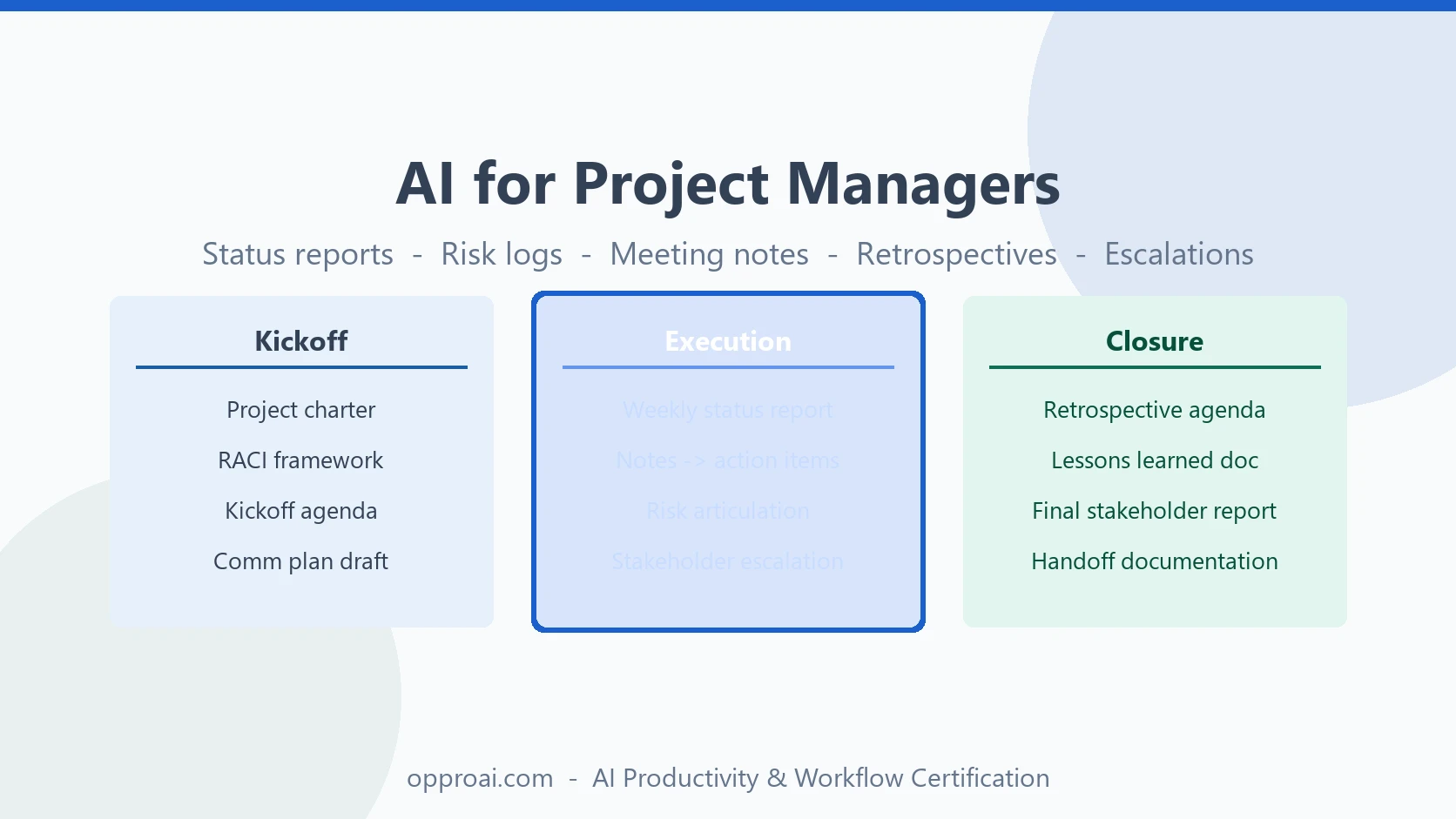
Project management has a documentation problem.
The actual work of managing a project — aligning stakeholders, surfacing risks, making decisions, keeping the team moving — is a relatively small percentage of a PM's week. A large and growing share of the time goes to the overhead: writing the status report, formatting the risk log, summarizing yesterday's meeting, preparing the exec briefing, running the retrospective, updating the project tracker.
This overhead is necessary. It keeps stakeholders informed, surfaces issues early, creates accountability, and builds a record of decisions. But it does not have to take as long as it does.
AI creates genuine leverage across all of it — not by replacing the PM's judgment, but by compressing the time between "I have the information" and "this is organized and ready to share."
Here is how experienced project managers are using AI across the full project lifecycle.
Where AI Creates the Most Leverage in Project Management
Before getting into specific workflows, it helps to understand where AI actually belongs in a PM's toolkit.
AI is not a project management system. It does not replace your JIRA, Asana, or Monday. It does not track dependencies, manage permissions, or send alerts. Those tools own the system of record.
AI is useful at the communication and documentation layer — the place where information gets turned into decisions, updates, reports, and analysis. That layer is where most PMs spend a disproportionate amount of time relative to the value created.
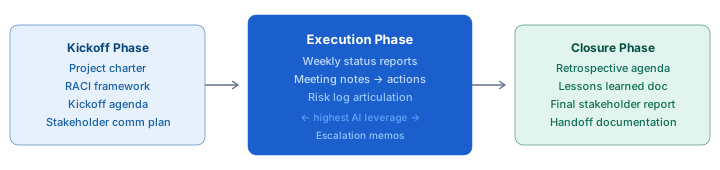
The three highest-leverage zones:
- Status reporting — turning raw progress notes into structured, stakeholder-ready updates
- Meeting documentation — turning call notes into decisions, actions, and risks in under two minutes
- Risk articulation — turning a vague concern into a clearly framed risk entry with owner, likelihood, and mitigation
Phase 1: Kickoff — Sharper Setup Documents
The kickoff phase involves a cluster of documents that every PM writes repeatedly: project charters, scope summaries, RACI frameworks, kickoff meeting agendas, and stakeholder communication plans.
These documents are formulaic enough that AI can produce strong first drafts from your specific inputs — and specific enough that the PM still needs to own the content.
Project charter prompt:
I'm kicking off a [type of project] for [stakeholder/sponsor]. The goal is [specific outcome]. Timeline is [start] to [end]. Core team is [list roles]. Key risks we've identified so far: [list]. Draft a one-page project charter with sections for: objective, scope, out of scope, team, timeline, success criteria, key risks. Keep it tight — this is an executive-facing document.
Kickoff agenda prompt:
I'm running a 60-minute project kickoff for a [project type] with [number] stakeholders including [roles]. The main things I need to accomplish in the meeting: [list]. Draft an agenda with timings and the facilitating goal for each section.
These prompts consistently produce a workable first draft in under a minute. Editing that draft to fit your specific project takes five to ten minutes. The alternative — starting from a blank doc — typically takes thirty to forty-five minutes.
Phase 2: Execution — The Weekly Status Report
Weekly status reports are the single highest-ROI use of AI for project managers.
They are produced every week, they follow a consistent structure, and they consistently take longer than they should. Many PMs spend one to two hours each week writing status reports across multiple projects. AI can compress that to fifteen minutes.
The approach that works:
- Keep rough weekly notes throughout the week — not structured, just bullets. What progressed, what is blocked, what decisions were made, what risks surfaced, what is coming up next week.
- At reporting time, paste those notes into AI with context about your audience and the required structure.
- Refine the output for accuracy and tone. Verify anything that involves numbers, dates, or specific names.
Status report prompt:
I'm writing a weekly status report for [project]. The audience is [stakeholder level — e.g., executive sponsor, steering committee]. Here are my raw notes from this week: [paste notes]. Draft a status report with sections for: overall status (RAG), accomplishments this week, risks and issues, decisions needed, and next week's focus. Keep the tone professional and direct. Flag any risks clearly without being alarmist.
The RAG (Red/Amber/Green) status assessment still requires your judgment — AI does not know your organization's risk tolerance or political context. But the language, structure, and completeness of the report can be AI-assisted.
Phase 2: Execution — Meeting Notes to Action Items
The post-meeting documentation problem is one of the most consistent time drains in project management.
A 60-minute project meeting generates 60 minutes of conversation that needs to be compressed into: decisions made, action items with owners and due dates, risks surfaced, and open questions.
Without AI, this takes fifteen to thirty minutes after every meeting. With AI, it takes two to three minutes.
The prompt pattern that works for meeting-to-action documentation:
Here are my raw notes from a [project name] meeting on [date]. Attendees: [list]. Summarize into four sections: Decisions Made, Action Items (with owner and due date), Risks or Issues Raised, and Open Questions. Bullet format. Precise and brief.
Two important notes: First, AI will infer action item owners from how they are mentioned in your notes — always verify this before distributing. Second, if anything in the decisions or risks list looks off, that is the PM's professional responsibility to correct before the notes go out.
Phase 2: Execution — Risk Log Articulation
One of the most underused applications of AI in project management is risk articulation.
Most PMs know when something feels risky. The harder skill is translating that feeling into a precise risk entry that stakeholders can actually act on: a clear statement of the risk, an assessment of likelihood and impact, a named owner, and a concrete mitigation plan.
AI is useful here as a thinking partner more than a drafter.
Risk articulation prompt:
I'm concerned about [describe the concern in plain language]. The project context is [brief background]. Help me articulate this as a formal risk entry: risk description, likelihood (High/Medium/Low), potential impact, risk owner, and mitigation approach. Be specific and direct.
This prompt does two things: it forces clearer thinking about what the risk actually is, and it produces a formatted entry that goes directly into the risk log. Both save time and raise quality.
Phase 2: Execution — Stakeholder Escalations
Escalations are among the most difficult communications a PM writes. The goal is to surface a problem, establish its severity, and secure a decision or resource — without sounding like the project is off the rails or that blame is being assigned.
AI handles the structural challenge well. Your job is to provide the specifics.
Escalation prompt:
I need to escalate [describe the issue] to [executive or stakeholder]. Background: [brief context]. What has been tried: [actions taken]. Current status: [where things stand]. What I need from them: [specific decision or resource]. Draft a professional escalation email that is direct about the problem without being alarmist. Lead with the impact and the ask. Keep it under 200 words.
Phase 3: Closure — Retrospectives and Lessons Learned
Retrospectives are consistently underprepared and underutilized. AI can help with both problems.
Retrospective prep: Give AI your notes from the project — status reports, risk log, key decisions, major blockers — and ask it to generate a structured retrospective starting point. What went well, what did not, patterns it notices, suggested areas for discussion. This gives the facilitator a prepared agenda rather than starting from blank.
Here are status reports and notes from [project] over [timeframe]. Based on this, draft a retrospective agenda with: what went well, what didn't, patterns you notice, and suggested focus areas for the discussion. Keep it balanced and constructive.
Lessons learned documentation: After the retrospective discussion, paste your notes and ask AI to turn them into a structured lessons learned document organized by category (process, communication, risk management, tooling). This document is usually deprioritized at project close; AI makes it fast enough to actually do.
Building a PM Prompt Library
The project managers who get the most from AI have built a small prompt library for their recurring PM tasks:
- Weekly status report (by audience type: exec, steering committee, team)
- Meeting summary → action items
- Risk entry articulation
- Escalation email
- Kickoff agenda
- Stakeholder communication plan
- Retrospective agenda
Each of these prompts took one iteration to develop and now runs on repeat. The cumulative time saving across a 12-month period is substantial.
A personal prompt library is one of the highest-return investments a PM can make in their AI workflow. It takes about 30 minutes to build a starting set and compounds value every week.
What Stays with the PM
AI does not manage your project. It does not know what is politically sensitive, who is under-delivering, or why the risk that looks medium on paper is actually critical in your specific context. It cannot make the judgment call about whether to escalate, what to include in the exec summary, or whether the team is actually on track behind the green status indicator.
Those judgments are the job. AI handles the documentation and communication layer so you can spend more of your time on the judgment layer.
The OpPro AI AI Productivity & Workflow Certification includes workflows built specifically for knowledge workers in high-documentation roles like project management — prompting, review processes, and the judgment framework that keeps professional standards high.