
If your AI tool is already integrated with your inbox — through something like Copilot in Outlook, Gemini in Gmail, or a similar assistant — there is a good chance you are still underusing it.
Not because the tool is weak. Because most people use inbox AI reactively.
They ask one-off questions. They draft the occasional reply. They maybe summarize a thread when they are already overwhelmed. What they do not usually do is run a system.
That is the opportunity.
The real value of AI in email is not that it writes every message for you. It is that it can help you review, triage, prioritize, and close out inbox work more systematically.
That is where recurring prompts come in. Recurring prompts are one of the simplest ways to turn inbox management from scattered, reactive decision-making into a lightweight daily workflow.
Why inbox management is a strong AI workflow use case
Inbox work is repetitive, cognitively draining, and easy to underestimate.
The problem is usually not the number of emails alone. It is the number of decisions hidden inside them. Every inbox session asks you to figure out what actually matters right now, what needs a response today, what can wait, what belongs on a to-do list instead of staying in email, what should be delegated, and what you are forgetting to follow up on.
That is exactly the kind of work that benefits from AI support. Not because AI should make the decisions for you, but because it can help organize the inputs, reduce the noise, and make the decision-making process more consistent.
Inbox management is a strong AI workflow use case because it is high-frequency, mentally expensive, and follows recurring patterns.
What a recurring AI prompt actually is
A recurring AI prompt is not just a prompt you happen to reuse. It is a saved prompt designed for a recurring decision or review process that you run on a cadence.
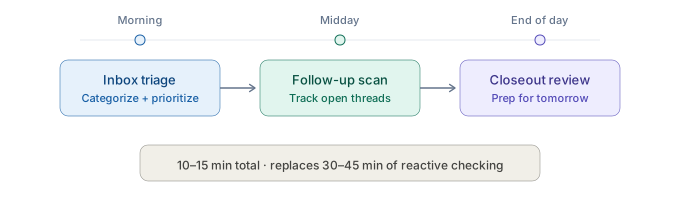
For inbox management, that might mean a morning triage prompt, a midday follow-up prompt, and an end-of-day closeout prompt.
The jump from "I asked AI to help with email today" to "I run a three-prompt inbox rhythm every day" is the jump from dabbling to operating with a system. This is the same principle behind the Build-Refine-Deliver framework — structure creates consistency.
These prompts are not meant to be rigid scripts. They are optional, dynamic starting points. The wording, categories, and timing should be adapted to how you actually work. A manager may want different categories than an analyst. A founder may want a different cadence than an operator working in a shared queue.
The value is not in repeating the exact same words every day. The value is in making the workflow recurring. Once the prompts are part of your rhythm, the system no longer depends on memory or willpower. It becomes part of how you manage your inbox. They work best when scheduled recurringly — built into your daily operating rhythm rather than used whenever you remember.
Three recurring AI prompts for smarter inbox management
These prompts assume your AI assistant can already see your inbox and relevant threads. They are designed to help you review, categorize, prioritize, and prepare — not to take autonomous action without your judgment.
You can also find these and more in the OpPro AI Prompt Library.
1. Morning inbox triage prompt
Use this at the start of your workday to understand what matters most.
Review my inbox from this morning and organize my messages into 4 groups:
- Respond today — needs my direct reply or a decision from me
- Important but can wait — relevant but not time-sensitive today
- Delegate or forward — someone else is better suited to handle this
- Low priority / informational only
For each message or thread, give a one-line reason for the categorization. Then tell me the top 3 items I should handle first. Flag anything that looks time-sensitive or involves a direct request from leadership.
This prompt reduces one of the hardest parts of inbox work: deciding where to start. It helps you move from "I have a lot of email" to "here is what actually matters first."
2. Midday follow-up prompt
Use this in the middle of the day to see what still needs movement.
Look at the threads I have been active in today and help me identify what still needs attention.
Format the answer as two lists:
- Things I need to do — responses I owe, decisions pending, action items on me
- Things I'm waiting on — replies from others, pending deliverables, open questions
Keep each item to one line. For the most urgent item on my list, suggest what my response should accomplish in one sentence.
This prompt helps you avoid the midday drift where important threads sit half-finished because the inbox is already cluttered again.
3. End-of-day closeout prompt
Use this near the end of the workday to reduce mental clutter and prepare for tomorrow.
Based on my email activity today, help me review my inbox and prepare for tomorrow.
Start with a one-sentence summary of what I accomplished today based on these threads.
Then identify:
- Anything urgent that still needs attention before tomorrow
- Follow-ups I should handle first thing tomorrow morning
- Any commitments or tasks I made today that should move to my to-do list
- A short summary of what matters most going into tomorrow
Keep the output concise and practical.
This prompt creates closure. Instead of ending the day with a vague sense of unfinished inbox stress, you leave with a cleaner picture of what moved, what still matters, and what tomorrow needs.
Optional: Draft-response helper
This is not the main point of the workflow, but it can be useful once triage is already done.
Help me draft a professional reply to the email or thread below.
Goal: [state the goal] Tone: [direct / warm / concise / diplomatic] Constraints: keep it under [X] words, include a clear next step, do not sound overly formal or generic.
Use the context from the thread and draft something I can review and personalize before sending.
It supports execution after prioritization, without replacing the judgment that should guide how you communicate.
What this workflow looks like in practice
A simple inbox rhythm might look like this:
Morning: Run the inbox triage prompt to get clear on what matters most before your day starts reacting to everyone else's agenda.
Midday: Run the follow-up prompt to catch anything that still needs movement and make sure active threads do not get lost.
End of day: Run the closeout prompt to reduce mental clutter, document what still matters, and make tomorrow easier to start.
That is the system. Not fifteen random AI interactions. Not a vague intention to "use AI more." A rhythm.
Used consistently, a workflow like this can replace scattered inbox checking with a more deliberate cadence that takes far less mental energy.
Where judgment still matters
AI can help you organize the inbox. It can help you see patterns. It can help you identify likely priorities and draft useful responses.
But it should not own the parts of email that depend on human judgment.
That includes sensitive tone, political nuance, relationship management, escalation decisions, leadership dynamics, conflict, and anything where accountability clearly belongs with you.
The professionals who use AI most effectively are not the ones who hand everything over. They are the ones who use AI to clear enough noise that their judgment can focus where it matters most.
This workflow is not about giving up control of the inbox. It is about making inbox decisions more consistent, more intentional, and less mentally draining.
Why this matters beyond email
Recurring inbox prompts are useful on their own. But they are also something bigger.
They are a simple example of what happens when you stop treating AI like a one-off assistant and start using it as part of a repeatable system.
That same pattern shows up in other work too: meeting closeout, prioritization, reporting, task review, and follow-up workflows.
And over time, this is also part of the bridge toward more agentic ways of working. Not because you need to hand everything over to an agent. But because good agentic systems still depend on the same foundation: clear goals, recurring workflows, structured prompts, review, and judgment.
Recurring prompts are small systems. And small systems are often where better AI use really starts.
What to do next
The professionals getting the most value from inbox-connected AI are not the ones asking the most random questions. They are the ones running better systems.
Recurring prompts are one of the simplest ways to do that. They help you turn email from a reactive habit into a more intentional workflow — one that supports better prioritization, cleaner follow-up, and less mental drag across the day.
If you want to build more systems like this, OpPro AI's AI Productivity & Workflow Certification is designed to help working professionals use AI with more structure, workflow clarity, and judgment.