AI is now part of the standard professional toolkit.
Most office workers have tried it. Most have had some useful results — a faster email draft, a cleaner summary, a brainstorm that would have taken twice as long. But most also hit a ceiling fairly quickly. The output starts to feel repetitive. The results are inconsistent. The novelty wears off, and AI settles into something they use occasionally, for small tasks, without much confidence.
That ceiling is not a tool problem. It is a skill problem.
The professionals who get consistent, professional-quality results from AI are not using better models or secret prompts. They are using AI with a clearer method. They understand where it creates leverage, how to work with it effectively, and how to review the output before anything goes out.
This guide covers all of that — from first principles to practical systems — so you can use AI at work in a way that actually holds up under professional standards.
What Using AI at Work Actually Means
"Using AI at work" means different things to different people.
For some, it means occasionally pasting something into ChatGPT and seeing what comes back. For others, it means AI is built into how they approach recurring work — drafting, summarizing, analyzing, organizing, communicating — with a consistent process and predictable output quality.
The gap between those two is not about tool access. Almost everyone has access to the same tools.
The gap is about operating with AI versus experimenting with it.
An AI operator is a working professional who has moved past the experimental stage. They know where AI creates real leverage in their specific role. They use it with enough structure that the results are consistently useful. They apply judgment before anything goes out the door.
That is the target. And it is reachable for any professional, regardless of technical background.
Where AI Creates Real Leverage at Work
Before learning how to use AI better, it helps to understand where it is actually worth using.
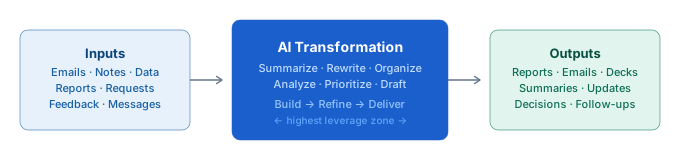
Most jobs, no matter the title, can be broken into three parts:
- Inputs — information that comes in (meeting notes, emails, data, requests, reports, feedback)
- Transformations — what you do with that information (summarize, rewrite, organize, analyze, prioritize, structure)
- Outputs — what you produce (reports, recommendations, emails, presentations, decisions, follow-ups)
The inputs and outputs are usually obvious. The transformation is where most of the friction lives — and it is also where AI creates the most consistent leverage.
If you are summarizing a long document, drafting a communication, restructuring a set of notes, extracting key points from a report, or organizing information into a usable format, that is transformation work. And transformation work is exactly what AI does well.
The practical question to ask in any work context is: Where am I repeatedly transforming information, and could AI help with that step?
That framing moves AI from a novelty you try occasionally to a lever you pull deliberately.
The Biggest Mistake Professionals Make With AI
Most professionals treat AI like a search engine.
Type a question. Get an answer. Move on.
That works for simple, one-off questions. It consistently fails for professional work because professional tasks are not simple and one-off — they require context, structure, judgment, and iteration.
When you type a vague request and get back a vague response, that is not a sign the tool does not work. It is a sign the interaction was not structured well enough to produce something useful.
The most common failure modes:
Too little context. AI works with what you give it. If you give it a task without audience, purpose, tone, or background, the output fills those gaps on its own — usually with something generic.
Stopping at the first draft. Most people treat the first response as the output. Strong AI use treats the first response as a starting point. One or two refinement prompts usually represent the biggest quality jump in the whole interaction.
Skipping the review step. AI does not know your professional context, your relationships, your organization's sensitivities, or what happened in last week's meeting. Output that gets sent without review is output that can create real professional risk.
No system. Casual AI use is one-off and unstructured. It does not compound. The professionals who get the most out of AI have built a repeatable system — not just a habit of trying things.
The Build-Refine-Deliver Framework
The most reliable way to get professional-quality output from AI is to use a three-step interaction process rather than a single prompt.
The Build-Refine-Deliver framework is a practical method for doing exactly that.
Build
Give AI enough context to produce a useful first draft.
A simple way to think about this: answer four questions before you write the prompt.
- Who is this for? (audience, seniority, relationship)
- What do I need? (the specific output)
- With what background? (relevant context, raw notes, data)
- What does good look like? (tone, length, format, constraints)
You do not need to answer every question every time. But the more you give, the less AI has to guess — and less guessing means more useful output.
Refine
This is the step most people skip entirely.
The first response is rarely the best one. One or two focused refinement prompts can move output from 6/10 to 9/10. Good refinement prompts target specific things: tone, structure, length, emphasis, clarity, precision.
Examples:
- "Make this more direct. Cut anything that doesn't add meaning."
- "This is 30% too long. Trim it without losing the core message."
- "The opening buries the point. Lead with the conclusion."
- "Adjust the tone — this should feel like a peer conversation, not a formal memo."
You are not rewriting from scratch. You are steering.
Deliver
This step shapes the output for immediate use.
A good answer in the wrong format is still friction. The Deliver step asks AI to format the output specifically for how it will be used — as an email, a bullet list, a set of slide talking points, a one-page summary, a Slack message, or direct copy-paste text.
Deliver removes the gap between "AI helped" and "this is ready."
How to Use AI for Common Workplace Tasks
Here is how the Build-Refine-Deliver approach plays out across the most common recurring professional tasks.
Meeting Summaries
Summarizing a meeting with AI is one of the fastest time recoveries available to working professionals. A task that typically takes 20–40 minutes can be done in under two minutes with a well-structured prompt.
The prompt structure that works:
You are a professional [role]. Summarize these meeting notes into three sections: decisions made, key discussion points, and action items with owners. Use bullet points. Keep it under 200 words.
Paste in your raw notes. Review the output for accuracy — especially action item owners and any numbers or dates. Light edit, send.
Email Drafts
AI is strong at producing a complete first draft from a short description. The draft almost always needs editing for tone and specificity, but starting from something is significantly faster than starting from nothing.
For difficult emails — a declination, a follow-up after no response, a message that needs careful calibration — AI is especially useful. You can give it the relationship context, the goal, and the constraints, and get back a starting point that has already done most of the structural thinking.
Document Summaries
Long reports, proposals, research papers, and email threads can be summarized reliably by AI. The key is specifying what kind of summary you need — an executive summary, a list of key findings, a set of decision-relevant points, or a short paragraph for someone who has not seen the document.
One refinement worth running on any document summary: "Does this include anything I would need to know to make a decision about this?" That catches gaps the first draft often misses.
Status Updates
Weekly status updates are one of the highest-ROI uses of AI in a professional context because they happen every week, they follow a consistent structure, and they tend to take longer than they should.
A reliable prompt: give AI your bullet-point notes from the week, define the audience (leadership, team, client), specify the sections you need (progress, blockers, next week), and set a length target. The output usually requires only light editing.
Research and Extraction
AI is useful for extracting specific information from large amounts of text — the main argument in a long paper, the three strongest points in a report, the risks mentioned in a contract, the commitments made in an email thread.
This kind of extraction work is where AI creates leverage that is hard to replicate through other means. What would take 30 minutes of reading and note-taking can often be done in 60 seconds with a well-targeted prompt.
Building a Personal Prompt Library
The professionals who get the most out of AI are not the ones who write the cleverest prompts on the fly. They are the ones who have saved their best prompts and reuse them.
Building a personal prompt library is one of the most practical, highest-return investments a professional can make in their AI workflow. It takes about 30 minutes to start and compounds value every week after that.
The core system:
- Identify the tasks you do on repeat (meeting summaries, status updates, email drafts, document summaries)
- Capture the exact prompt text when AI produces a result you actually use
- Generalize it — replace specific details with [placeholders] while keeping the structure intact
- Organize by task type (Draft, Summarize, Review, Analyze) rather than topic
- Add a note on when each prompt works best
A basic prompt library with 10–15 entries covering your highest-frequency tasks will save meaningful time from day one. OpPro AI's free prompt library is a good starting point — 22 templates across seven categories, no signup required.
The Review Step: Where Accountability Lives
Every AI output needs a review before it goes anywhere.
This is not optional, and it is not about distrust of the technology. It is about professional accountability. The work that goes out under your name reflects on you — not on the tool that helped produce it.
The five-question review takes 60–90 seconds and applies to any AI-assisted output:
- Accurate? Are all facts, figures, and claims correct?
- Context fit? Is there anything AI could not have known that needs to be added?
- Tone right? Does this sound appropriate for this person and this situation?
- Sensitive? Is there anything in here that should not travel further?
- Useful? Does every part of this earn its place?
Building the review habit is what separates AI as a productivity tool from AI as a professional liability.
Building Repeatable AI Systems at Work
The biggest gap between casual AI use and strong AI use is repeatability.
Casual users start from scratch every time. They run one-off experiments and get one-off results. Strong AI users — AI operators — have built systems: saved prompts, consistent processes, recurring workflows, and a review habit that does not depend on how they feel on a given day.
The path from occasional user to AI operator is not about learning more prompts. It is about building three things:
A task map. Know specifically where in your work AI creates the most leverage. Not "everywhere" — pick the three to five recurring tasks where the time and quality gains are most significant.
A prompt library. Save what works. Do not rebuild from scratch every time you sit down to use AI for a recurring task.
A review process. Make it automatic, not occasional. Every output, same five questions, every time.
These three things, applied consistently, represent the full operating system of a strong AI practitioner. None of them require technical expertise. All of them are learnable.
The Career Case for AI Fluency
Using AI effectively at work is increasingly a professional differentiator.
A PwC analysis found that workers with demonstrated AI skills command a 56% wage premium over peers without them. That gap exists because genuine AI fluency — not just tool access, but the ability to get consistently professional results from AI — is still relatively rare.
The professionals capturing that premium are not necessarily the most technical. They are the ones who have built a structured approach to using AI: a clear framework, a personal prompt system, and the judgment to know when to use AI and when not to.
That is a learnable set of skills. And the window for building them ahead of the curve is still open — though it will not stay that way indefinitely.
How to Get Started Today
If you want to move from occasional AI use to operating with AI consistently, the practical starting point is:
This week: Identify one recurring task in your work where AI could help. Use the Build-Refine-Deliver loop on it once. Save the prompt that produced a useful result.
This month: Build a basic prompt library. Five to ten entries for your most frequent tasks. Organize it by task type. Add the review habit.
Over time: Identify the other high-leverage tasks in your role. Expand the library. Build the system.
The learning curve is shorter than most people expect. The first result that feels genuinely professional — output you would send with minimal editing — usually comes within the first few real attempts with a structured process.
If you want to build that foundation more deliberately and earn a verifiable credential in the process, the OpPro AI AI Productivity & Workflow Certification covers the complete framework — prompting, workflow design, judgment, and the skills that hold up under real professional standards. About two hours, self-paced, exam-based, and LinkedIn-ready.