For most of working history, getting answers out of a spreadsheet required one of two things: the technical skill to write a formula, a query, or a script — or a favor from someone who had it.
If you were in operations, finance, HR, marketing, or any role that runs on data but does not require an engineering background, you lived with that constraint. You either learned enough pivot-table mechanics to get by, or you waited in a queue for the one analyst who could pull what you needed.
That barrier is mostly gone. You can now hand a dataset to an AI tool, ask a question in plain English, and get an analysis back in seconds — no SQL, no Python, no formulas. The skill that matters is no longer technical. It is knowing what to ask and how to confirm the answer is right.
This is a practical workflow for doing exactly that.
What "AI Data Analysis" Actually Means Now
A quick clarification, because the term covers two different things.
The first is using AI as a thinking partner for analysis — describing your data and asking how to approach a question. Useful, but limited, because the model is reasoning about data it cannot see.
The second is the one that changed the game: tools that actually ingest your file and analyze it directly. Upload a spreadsheet or CSV, and the AI reads the real numbers, runs the calculation, and shows you the result — often with a chart. This is available in the major assistants now, and it is what makes genuine no-code analysis possible.
Everything that follows assumes the second kind: you are giving the tool your actual data, not just describing it.
The Workflow
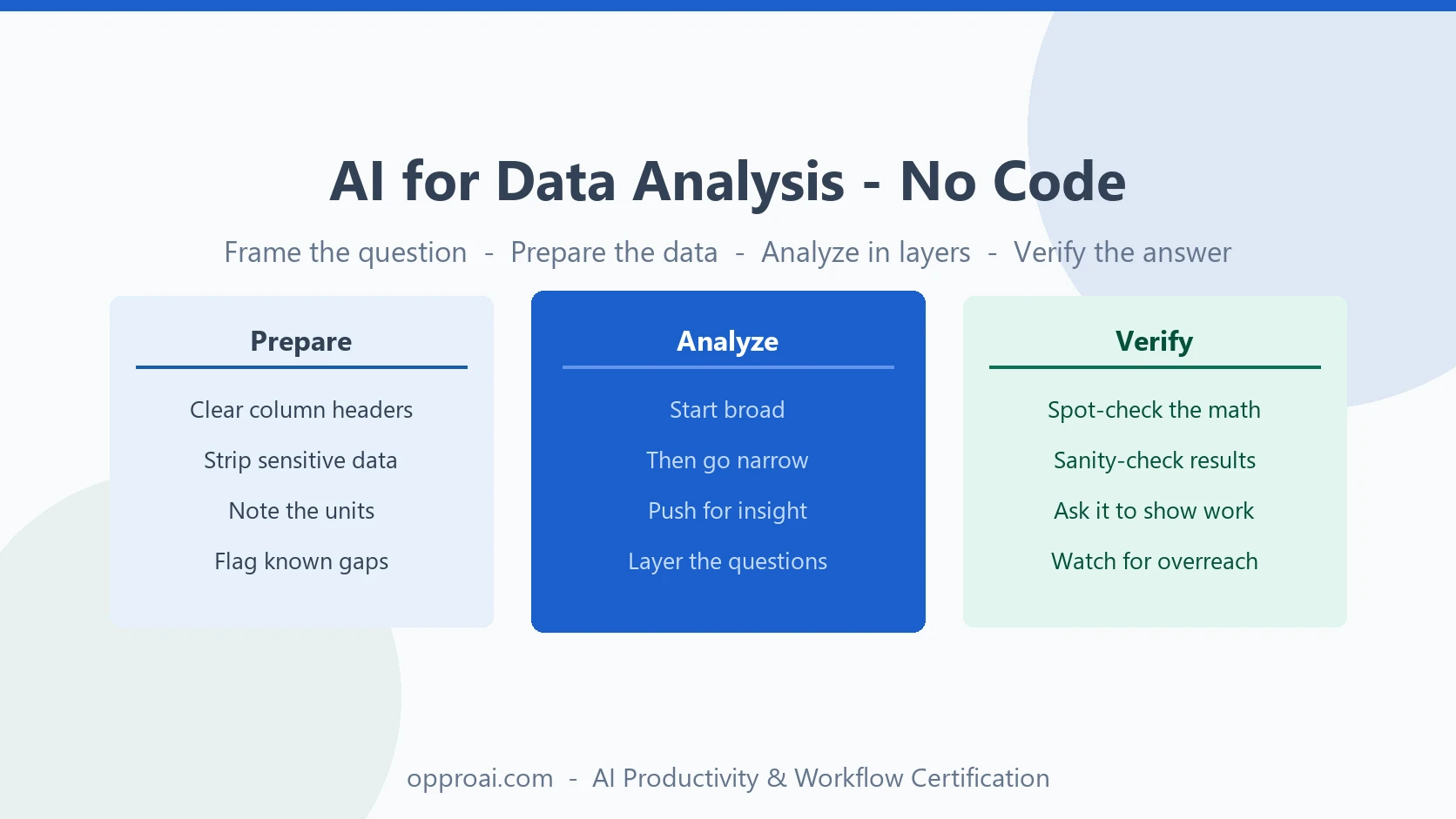
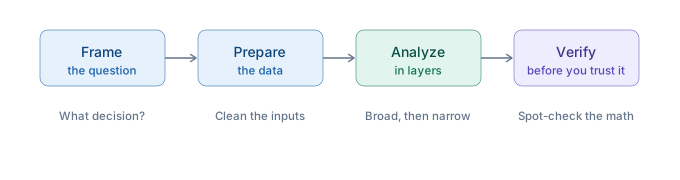
Good analysis is not "upload the file and ask what it says." That produces a generic summary you could have written yourself. The professionals who get real answers follow a sequence: frame the question, prepare the data, analyze in layers, and verify before they trust it.
Step 1: Frame the Question Before You Upload
The most common mistake is starting with the data instead of the question. You end up with a tour of the spreadsheet rather than an answer to anything that matters.
Decide what decision the analysis is supposed to inform. "Which regions are underperforming and why" is a question. "Tell me about this sales data" is not.
A sharp question does two things: it tells the AI what to look for, and it gives you a way to know whether the answer is any good. Before you upload anything, finish this sentence: By the end of this, I want to know ______.
Step 2: Prepare the Data
AI is good at reading messy data, but it is not magic, and a few minutes of cleanup dramatically improves what comes back.
- Give every column a clear header. "Q3_Revenue" is readable. "Column F" is not.
- Remove anything sensitive. Strip names, account numbers, and personal information before the file leaves your machine — especially in any tool not approved for confidential data. This is a judgment call you own, not one to delegate.
- Note the units and context. Tell the model what the numbers represent: dollars, headcount, percentages, dates in a particular format.
- Flag known issues. If a column has gaps or a few rows are estimates, say so. The model will handle it more honestly if it knows.
Clean inputs are the difference between an analysis you can trust and one built on quietly misread columns.
Step 3: Analyze in Layers
Do not ask for everything at once. The strongest analysis comes from a conversation, not a single command — the same build-then-refine pattern that works everywhere else with AI.
Start broad to get oriented:
Here is our regional sales data for the last four quarters. Give me a high-level summary: total by region, the overall trend, and anything that immediately stands out as unusual.
Then go narrow based on what you see:
The Northeast dropped 18% in Q3 while every other region grew. Break down the Northeast numbers by month and by product line. Where specifically is the decline coming from?
Then push for insight, not just description:
Based on this data, what are the two or three most likely explanations for the Northeast decline? For each, tell me what additional data would confirm or rule it out.
Notice the progression: orient, then isolate, then interpret. Each answer sharpens the next question. This layered approach is the Build-Refine-Deliver framework applied to data — and it produces analysis that a single "analyze this file" prompt never will.
Step 4: Verify Before You Trust It
This is the step that separates a professional from someone about to put a wrong number in front of their boss.
AI data tools are powerful, but they make mistakes — misreading a column, mishandling blank cells, misinterpreting what a field represents, or stating a confident conclusion the data does not actually support. You cannot tell from the tone of the answer whether it is right. It always sounds right.
So verify:
- Spot-check the math. Pick one number the AI reported and confirm it against the source yourself. If a total or an average is off, the whole analysis is suspect.
- Sanity-check against what you know. If the result contradicts something you understand about the business, do not assume the AI found a hidden truth. Assume it made an error until you have confirmed otherwise.
- Ask it to show its work. "What rows did you include in that calculation, and what did you do with the blank cells?" The answer often reveals a flawed assumption.
- Watch for confident overreach. A model will happily tell you why revenue dropped from numbers that only show that it dropped. Correlation dressed up as causation is the most common failure mode.
This verification habit is the entire ballgame, and it is covered in depth in how to review AI output. For data specifically, the rule is simple: the AI does the calculation, you confirm it is true before it informs a decision.
What This Changes for Non-Technical Professionals
For years, "I am not technical" was a real limit on how much you could do with data. It is no longer much of one.
The analyst who used to spend an afternoon building a report can get the first pass in minutes and spend the saved time on interpretation. The manager who used to wait in the queue can answer their own question on the spot. The coordinator who never learned formulas can investigate a trend without asking anyone for help.
What does not change is the part that was always the real skill: asking a precise question, knowing what a sound answer looks like, and applying judgment to what the numbers mean. AI removed the technical barrier. It did not remove the thinking. If anything, it made the thinking the entire job — which is good news for any professional willing to do it well. That is what it means to be an AI operator rather than just an AI user.
You do not need to become technical. You need to become precise. And that is a skill anyone in a data-touching role can build.
If you want a structured way to build it — from framing questions to analyzing in layers to verifying output you can stand behind — the OpPro AI AI Productivity & Workflow Certification covers practical AI analysis as part of a broader professional workflow.