The frustration is familiar. You paste something into an AI tool, hit enter, and get back a wall of text that sounds plausible but doesn't actually match what you needed. Too long. Wrong tone. Missing the thing you cared about most. So you spend ten minutes editing it — or start over.
The problem usually isn't the AI. It's that the prompt didn't give the AI enough to work with.
Most professionals prompt the way they search online. Short. Vague. Hopeful. But AI language models don't work like search engines. They're pattern-completion systems that take their cues from the inputs you give them. If your input is vague, the output will match that vagueness — scaled up.
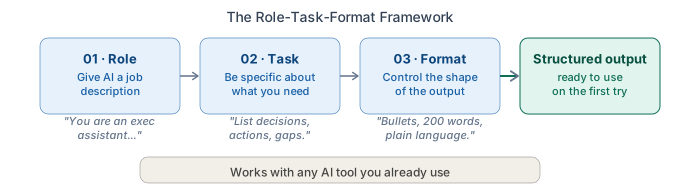
The fix is a framework called Role-Task-Format. It's three components, each one doing a specific job, and together they turn a weak prompt into a structured brief that AI can actually execute on.
Why Vague Prompts Produce Vague Answers
Here's a prompt that gets used dozens of times a day across thousands of workplaces: Write a summary of my meeting.
This prompt has the right intention but none of the detail that makes a useful output possible. The AI doesn't know what role it should play. It doesn't know which aspects of the meeting matter. It doesn't know how long the summary should be, who will read it, or what format is expected.
So it guesses. And its guess — while technically a meeting summary — is a generic version that doesn't quite fit your meeting, your team, or your workflow.
Compare that to: You are an executive assistant summarizing a team meeting. Identify decisions made, action items with owners, and open questions. Bullet points, under 200 words, plain language.
Same underlying request. Completely different output. The second prompt gives the AI a job description, a specific deliverable, and a format to follow. That's the Role-Task-Format framework — and it takes about fifteen seconds longer to write.
The Role Component: Give AI a Job Description
The first component, Role, is the most underused and highest-leverage upgrade you can make to any prompt.
Role tells the AI what perspective to take — what kind of expert to channel as it generates its response. Without a role, AI defaults to a generalist voice that's competent but rarely specific enough to be immediately useful. With a role, it calibrates everything: vocabulary, level of detail, tone, structure, and what it prioritizes.
How to write a Role: You are a [specific professional role] who [context or expertise].
Examples:
- You are an experienced HR manager reviewing a job description for clarity and inclusivity.
- You are a financial analyst summarizing a quarterly report for a non-technical leadership team.
- You are an executive communications specialist editing this email for clarity and brevity.
- You are a project manager writing a status update for stakeholders who care about timelines and risks.
A good Role doesn't just name a job title — it often includes the context or constraint that shapes the output. An HR manager reviewing for clarity and inclusivity produces a different response than one reviewing for legal compliance. The rule: the more specific the role, the more targeted the output.
The Task Component: Be Specific About What You Need
The second component, Task, is where most prompts technically live — but where they fall short because they stop at intent rather than instruction.
Summarize this is an intent. Identify the three main decisions made, list action items with names and deadlines, and flag any open questions is an instruction. The second version leaves no ambiguity about what you need.
How to write a Task:
State what you want, then add at least one qualifier: what to include, what to exclude, what to prioritize, or who the audience is.
Examples:
- Summarize this article, focusing on the main argument and the three most important supporting points.
- Rewrite this email to be more direct. Remove filler phrases. Keep the core message intact.
- Review this proposal for gaps in logic. Note any assumptions that aren't supported by evidence.
- Create a list of five follow-up questions I should ask in my next client meeting based on these notes.
The test for a good Task: if you gave your instructions to a capable colleague, could they execute without asking a clarifying question? If yes, your Task is specific enough.
The Format Component: Control the Shape of the Output
The third component, Format, is where professionals leave the most time on the table.
Without Format, AI decides how to structure its response — and it often chooses the format that looks complete rather than the one that's actually useful in your context. That usually means paragraphs when you needed bullets, a long response when you needed something short, or a formal tone when you needed plain language.
Format tells the AI what the output should look like: length, structure, formality, and any specific conventions that matter.
How to write a Format: [Structure] + [length or scope] + [tone or register if relevant]
Examples:
- Bullet points, under 150 words, plain language suitable for a team Slack message.
- Three short paragraphs. Professional but conversational tone. No jargon.
- A table with three columns: Task, Owner, Deadline. No preamble.
- A numbered list of ten items. Each item one sentence. No explanations.
Format doesn't always need to be elaborate. Sometimes a simple instruction like bullet points, under 200 words is enough to meaningfully change what you get back.
Putting It All Together
Here's what the Role-Task-Format framework looks like assembled:
Without RTF: Write talking points for my presentation.
With RTF: You are a senior communications strategist preparing a professional for a board presentation. Write five talking points covering the project's objectives, current status, key risks, mitigation steps, and recommended next actions. Each point two to three sentences, confident and executive-appropriate tone.
The difference isn't effort — it's structure. The RTF version takes about forty seconds to type and returns something closer to ready-to-use on the first pass.
Here are a few more before-and-after examples across common workplace tasks:
Email response:
- Without RTF: Help me respond to this email.
- With RTF: You are a professional in client services. Draft a response to this complaint email that acknowledges the issue, explains what happened without over-apologizing, and outlines the next step. Two to three short paragraphs, professional tone.
Research briefing:
- Without RTF: Summarize this report.
- With RTF: You are a research analyst preparing a briefing for a time-pressed VP. Summarize the key findings. Focus on what's actionable. Three bullet points, then a one-sentence recommendation. Plain language.
Interview prep:
- Without RTF: Give me questions to ask in my interview.
- With RTF: You are an experienced hiring manager. Generate eight interview questions for a mid-level project manager role, focusing on cross-functional collaboration, handling ambiguity, and stakeholder communication. Mix behavioral and situational formats.
The pattern holds regardless of which AI tool you use, or the task type. RTF is tool-agnostic because it addresses the fundamental gap in how most professionals prompt: specificity.
Building RTF Into Your Workflow
The goal isn't to write RTF prompts from scratch every time. It's to build a small library of RTF templates for the tasks you do repeatedly — then fill in the details as needed.
For most professionals, five to ten templates cover 80% of recurring AI use: email drafting, meeting summaries, document editing, research briefings, status updates. Once you have those templates, prompting becomes fast and consistent.
The Build-Refine-Deliver framework describes exactly this kind of system — where you treat each AI interaction as a structured workflow with a build step, a refinement step, and a delivery step, rather than a one-shot guess. RTF is how you strengthen the build step.
For the review step — what to do once you have AI output in hand — see How to Review AI Output Before Sending It. And if you're finding that the output sounds polished but still doesn't quite sound like you, How to Use AI Without Sounding Like AI covers how to edit for voice and credibility.
The Real Skill Is Knowing What to Specify
There's a broader point underneath all of this. The professionals who get the most value from AI aren't using better tools — they're giving better inputs.
What does a good input require? Domain knowledge. Clarity about what you need. An understanding of who your audience is, what matters to them, and what format serves them best. Those aren't AI skills. Those are professional skills. RTF just makes them portable into every prompt you write.
That's what becoming an AI Operator actually means in practice — not mastering new technology, but applying existing professional judgment to get reliable, high-quality output from the tools you already have access to.
Want to build practical AI fluency?
OpPro AI helps working professionals learn how to use AI in real workplace tasks — from better prompts to repeatable workflows to polished outputs you can actually use.
The AI Productivity & Workflow Certification covers the Role-Task-Format framework, the Build-Refine-Deliver method, and dozens of other techniques designed for professionals who want consistent results — not occasional ones.